


Onshape’s FeatureScript setParameter() method failing to set the intended parameter value.
The problem is usually due to the target parameter having already being manually set. Manual settings are applied after all features have been executed and therefor overrides programmatic updates.
Situation
A custom feature (Featurescript script) is failing to update some parameter (for example – a part’s appearance).
Reason
The problem is usually down to the order in which Onshape builds a design. The issue is that all manual settings made through the GUI interface (such as setting a material or appearance) are applied after all features have been built. Therefor any programmatic changes get overridden by the manual setting.
Solution
Manually reset the properties for that part…
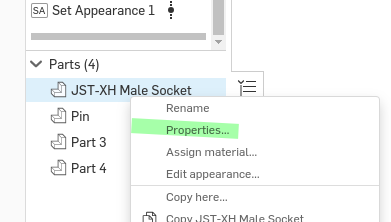
- Right-click on the problem part in the parts list in the right-hand panel and choose “Properties…” from the drop-down menu.
- Click the “Reset all” button at the bottom of the properties dialogue.
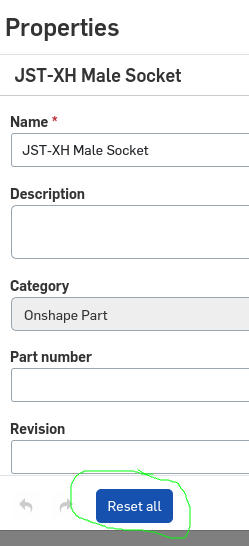
The part should now build and update correctly.