

- 2R-2 Bar Linkage
- 5R-5 Bar, Closed Loop, Linkage
2R-2 Bar Linkage
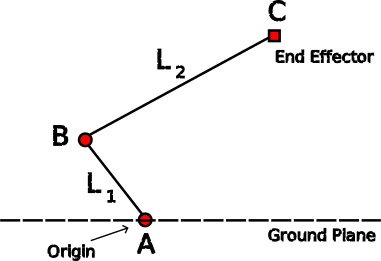
Probably the simplest of robotic arm/leg mechanisms. It operates in a 2D space, but can be modified to work in a 3D cylinder of space.
Easy to implement, but has several drawbacks which will be discussed later.
Overview
‘A’ and ‘B’ are revolute joints (hence 2R), while ‘L1‘ and ‘L2‘ are the 2 bar links. ‘C’ is the end effector platform, which is where an actuator, hand or foot would be placed.
‘A’ is grounded and does not change location, but it is driven by an actuator of some kind (servo, motor, etc) to swing ‘L1‘ in an arc on the X-Y plane. The origin for the co-ordinate system of the arm/leg is normally set to be on this joint, so ‘A’ will have co-ordinates of (X=0, Y=0).
‘B’ is also a driven revolute joint and is located at the other end of ‘L1‘ to joint ‘A’, and thus moves in the arc driven by ‘A’. ‘B’ is in turn connected to the end of link ‘L2‘ which it swings in an arc on the end of link ‘L1‘ (also on the X-Y plane). On the distant end of ‘L2‘ is ‘C’, which is the end effector platform and is where a foot, hand, or other actuator would likely be fitted.
What is being described here is a mechanism that works purely on the 2D X-Y plane. However, in most practical situations ‘C’, the end effector, would be required to move on a 3D X-Y-Z plane. The modification to enable this is relatively minor and will be briefly explained towards the end of this article.
For this mechanism to be useful in a robotic scenario one, or both, of the following two calculations will need to be made (depending upon use case):
- We know where the end effector ‘C’ needs to go, but we need to calculate the necessary angles to set joints ‘A’ and ‘B’ to achieve that movement. For instance to pick up a cup. This is the “Inverse Kinematics” calculation.
- We know the joint angles for ‘A’ and ‘B’, but we need to calculate where that has placed the end effector ‘C’. Perhaps we have just been powered on, or may be the arm is being manually manipulated to teach a particular movement pattern to the robot. This is the “Forward Kinematics” calculation.
Of course there are likely a lot more calculations that would be required in a real scenario, but the two above are the only ones directly relevant to how the mechanism works.
Inverse Kinematics
This is the working backwards from where we want to be, to how we are going to get there. It is likely to be the first problem that is needed to be solved to get a working robot arm/leg.
To solve this all we need is a reasonable grasp of the Pythagoras theorem, and the Law of Cosines. We will connect an imaginary line between points ‘A’ and ‘C’, and drop another imaginary line down from ‘C’ the the ground (perpendicular to the ground). Which should look something like this:
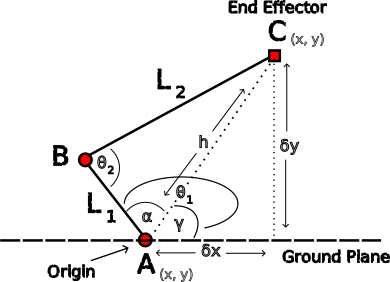
and the math that gos with this diagram looks something like this:
\[ \delta_y = C_y – A_y \]
\[ \delta_x = C_x – A_x \]
\[ h^2 = {\delta_y}^2 + {\delta_x}^2 \]
\[ \theta_2 = \arccos\left( \frac{L_1^2 + L_2^2 – h^2}{2*L_1*h} \right) \]
\[ \alpha = \arccos\left(\frac{(L_1^2 + h^2 – L_2^2)}{2*L_1*h}\right) \]
\[ \gamma = \arctan\left(\frac{\delta_y}{\delta_x}\right) \]
\[ \theta_1 = \alpha + \gamma \]
2R-2 Bar Inverse Kinematics Code
-
C++
-
Python
struct AB_Angles {
    float a;
    float b;
};

struct Point2D {
    float x;
    float y;
};

const float L1 = 40.0f;
const float L2 = 60.0f;

AB_Angles calcInverseKinematics(const Point2D a_pos, const Point2D c_pos) {
    float dy = (c_pos.y - a_pos.y);
    float dx = (c_pos.x - a_pos.x);
    float hSqrd = dy * dy + dx * dx;
    float L1Sqrd = L1 * L1;
    float L2Sqrd = L2 * L2;
    float theta2 = std::acosf((L1Sqrd + L2Sqrd - hSqrd) / (2 * L1 * L2)); // Radians

    float h = std::sqrtf(hSqrd);
    float alpha = std::acosf((L1Sqrd + hSqrd - L2Sqrd) / (2 * L1 * h)); // Radians
    float gamma = std::atan2f(dy, dx); // Radians
    float theta1 = alpha + gamma; // Radians

    // Convert to degrees and return
    return AB_Angles{ (theta1 * 180.0f / M_PIf), (theta2 * 180.0f / M_PIf) };
}
from math import acos, atan, sqrt, pi
from dataclasses import dataclass

L1: float = 40.0
L2: float = 60.0

@dataclass
class Point2D:
    x: float
    y: float

def calc_inverse_kinematics(a_pos: Point2D, c_pos: Point2D) \
        -> tuple[float, float]:

    dy: float = (c_pos.y - a_pos.y)
    dx: float = (c_pos.x - a_pos.x)
    h_sqrd: float = dy**2 + dx**2
    theta2: float = acos((L1**2 + L2**2 - h_sqrd) / (2 * L1 * L2)) # Radians

    alpha: float = acos((L1**2 + h_sqrd - L2**2) / (2 * L1 * sqrt(h_sqrd))) # Radians
    gamma: float = atan2(dy, dx)
    theta1: float = alpha + gamma  # Radians

    # Return angles in degrees
    return (theta1 * 180.0 / pi, theta2 * 180.0 / pi)
Forward Kinematics
This is working forwards from setting the angles of joints ‘A’ and ‘B’ to working out where the end effector ‘C’ will be. The need for this calculation is relatively rare in a hobbyist scenario as it requires that the mechanism is fitted with position feedback sensors on the joints. Also, it is more often associated with a human manually moving the arm to train the robot on new movement patterns. However, it is included here for completeness of understanding. It’s also a useful check to make sure that the calculation for inverse kinematics has been programmed correctly.
Again, the math can look intimidating at first glance, but it’s really just a combination of Pythagoras and the law of cosines. We will connect an imaginary line between points ‘A’ and ‘C’, and drop another imaginary line down from ‘C’ the the ground (perpendicular to the ground). Which should look something like this:
\[ h = \sqrt{L_1^2 + L_2^2 – 2.L_1.L_2.\cos(\theta_2)} \]
\[ \alpha = \arccos\left(\frac{L_1^2 + h^2 – L_2^2}{2.L_1.h}\right) \]
\[ \gamma = \theta_1 – \alpha \]
\[ C_y = A_y + h.\sin(\gamma) \]
\[ C_x = A_x + h.\cos(\gamma) \]
2R-2 Bar Forward Kinematics Code
-
C++
-
Python
struct Point2D {
    float x;
    float y;
};

const float L1 = 40.0f;
const float L2 = 60.0f;
Point2D calcForwardKinematics(Point2D a_pos, float aDegrees, float bDegrees) {
    float L1Sqrd = L1 * L1;
    float L2Sqrd = L2 * L2;
    float hSqrd = L1Sqrd + L2Sqrd - 2 * L1 * L2 * std::cosf(bDegrees * M_PIf / 180.0f);
    float h = std::sqrt(hSqrd);
    float alpha = std::acosf((L1Sqrd + hSqrd - L2Sqrd) / (2 * L1 * h)); // Radians
    float gamma = (aDegrees * M_PIf / 180.0f) - alpha; // Radians
    float cy = a_pos.y + h * std::sinf(gamma);
    float cx = a_pos.x + h * std::cosf(gamma);

    return Point2D{ cx, cy };
}
from math import cos, sin, acos, sqrt, pi
from dataclasses import dataclass

L1: float = 40.0
L2: float = 60.0

@dataclass
class Point2D:
    x: float
    y: float

def calc_forward_kinematics(a_pos: Point2D, a_degrees: float, b_degrees: float) -> Point2D:
    h_sqrd: float = L1**2 + L2**2 - 2 * L1 * L2 * cos(b_degrees * pi / 180.0)
    h: float = sqrt(h_sqrd)
    alpha: float = acos((L1**2 + h_sqrd - L2**2) / (2*L1*h)) # Radians
    gamma: float = (a_degrees * pi / 180.0) - alpha# Radians
    cy: float = a_pos.y + h * sin(gamma)
    cx: float = a_pos.x + h * cos(gamma)

    return Point2D(cx, cy)
Adaptation for 3D Space
The 2R-2 Bar Linkage itself can only operate in a purely 2D space within the X-Y plane. However, most real world use cases require it to operate in a 3D space. Fortunately the adaptation for 3D space is fairly straight forward. There are two options that are regularly implemented:
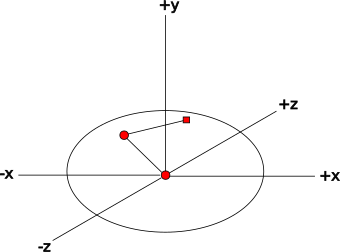
- To fit the revolute joint ‘A’ on to a turntable. By allowing the system as a whole to rotate, so too does the 2D plane on which it operates. Thus it enables the system to operate within a 3D dome of space. This is the most often implemented solution.
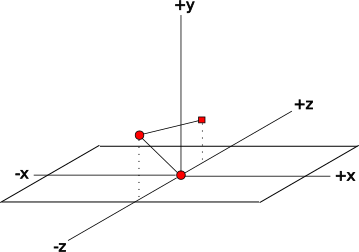
- To fit the revolute joint ‘A’ on to a platform mounted on a linear track. This allows the arm to operate within a 3D arched tunnel of space. It is less often the chosen solution, though it does have the advantage of requiring less extra calculations.
Adaptation Required for a Turntable Mounting
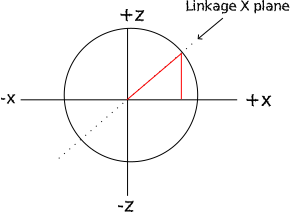
By mounting the mechanism on a turntable it has the effect of making it’s operational X-Y plane coincide with a revolving vertical slice along the diameter of the turntable. In practice, assuming that a Cartesian coordinate system is used, this means that the X-axis is operating on the hypotenuse of a right-angled triangle in the X-Z plane. The result of this is that two new calculations are required:
- The angle of turntable rotation required to place the linkages X-Y plane such that it passes through the required Z-coordinate.
- A translation from the required X-coordinate to the X-coordinate on the linkages X-Y plane, which will be larger than the asked for X-coordinate (unless Z==0).
Turntable Angle Calculation
\[ \theta_z = \tan\left(\frac{z}{x}\right) \]
X-Coordinate Translation
\[ x’ = \sqrt{x^2 + z^2} \]
Adaptation Required for Linear Track Mounting
By mounting the mechanism on a linear track at right angles to the X-Y plane of the mechanism, the effect is to allow the operating plane to slide sideways and thus produce a 3D working space. There are no new calculations required for this adaptation as the arm/leg’s X-Y plane is just an end view of the tunnel and the Z coordinate needs no adaptation as it is a linear slide along the tunnel.
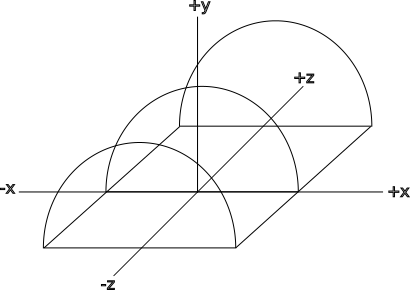
Perhaps one of the main reasons that it is less often chosen by hobbyists is that the mechanism itself is more complicated, requiring pulleys, belt and a rail to run on (or a rack and pinion). By comparison, mounting the arm on a servo or motor is mechanically much simpler. The added code complexity by contrast is a minor change that is easily accomplished.
Advantages & Disadvantages
Advantages
It is a very simple mechanism to implement, requiring only two linkages and two (or three) servos in it’s simplest incarnation. The code requirements are also minimal fitting on to most micro-controllers.
Disadvantages
Unfortunately with simplicity comes a few big disadvantages (depending upon use case):
- The base joint must bear the whole force that is applied to the end effector as well as the total force created by the moving mechanism at a severe mechanical disadvantage (due to leverage).
- If the knee/elbow joint ‘B’ has the servo/motor mounted directly in the joint, then that weight and momentum must be born by the base joint ‘A’.
- The calculations are necessarily floating point in nature and can strain the processing power of some micro-controllers which do not have hardware assisted floating point arithmetic.
- Accuracy of end effector placement can suffer due to the amplification factor of resolution limitations of joint angle positioning (especially the base joint ‘A’).